Pairing Devices
The recommended way to add devices to a hub is to follow the Heatmiser instructions for the device itself. Normally this involves using the Heatmiser App to put the hub into pairing mode. However, it is possible to do the same steps from this integration itself which in theory means you never have to use the Heatmiser App at all. You still have to follow the instructions for any steps that have to be done on the devices themselves.
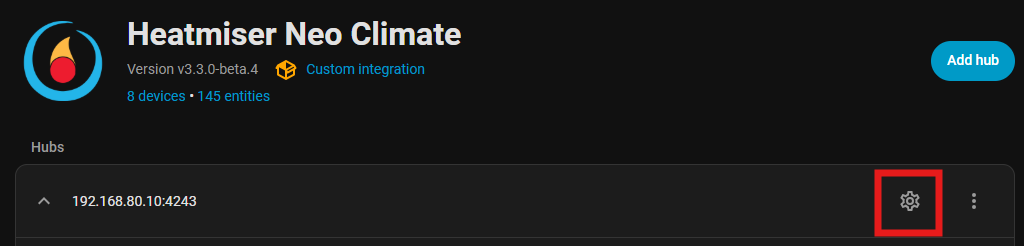
To start this flow, first go to the hub settings:
Then go to Advanced options and you have the option to add a device or a repeater:
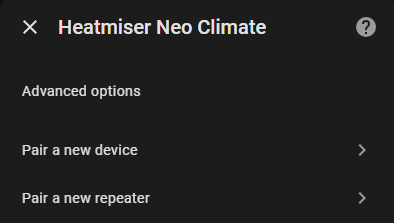
Repeaters can’t be named, so after selecting the repeater option, you have 120 seconds to follow the pairing instructions for a repeater.
For other devices (thermostats, timers, plugs or other accessories), you first have to specify the name that you wish to use for the device that is about to be added:
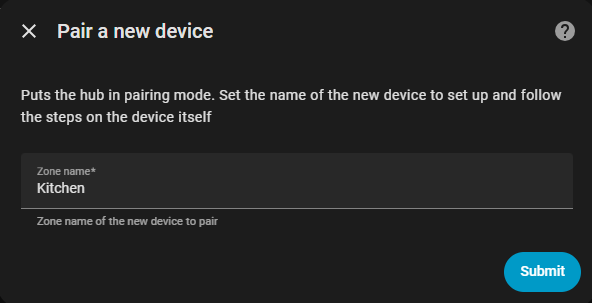
Then again you have 120 seconds to perform the actions on the device itself. Consult the manual of the device to find out the steps that are required.
If the new device is detected within the 120 seconds, you will get a confirmation and the integration will be reloaded to include the new device.
Devices added using the Heatmiser App or other external method will automatically be added to the integration once they are detected.
Removing devices
You can remove a device from the integrations device list or the device page itself. It will no longer be reported to HA or be visible in the Heatmiser App. If you remove it, you will need to re-add it using the Heatmiser App or using the pairing instructions above.
If a device is removed using the Heatmiser App or other external method, it will automatically be removed from the integration.